Resource Allocator and Power Simulator (RAPS)
RAPS is one of the modules used by the ExaDigiT framework. RAPS is a python code that either simulates workloads or replays historical workloads from system telemetry, and is able to predict dynamic energy consumption, as well as interact with the cooling model to predict cooling system behavior. Such a tool can be used together with reinforcement learning algorithms to provide an end-to-end optimization tool for data centers.
Installation
# Requires Python version >= 3.9
$ git clone https://code.ornl.gov/exadigit/raps
$ cd raps
$ pip install -e .
Quickstart
# Download dataset (270MB) related to Marconi supercomputer
$ wget https://zenodo.org/records/10127767/files/job_table.parquet
$ python main.py --system marconi100 -f job_table.parquet
Command line flags
usage: main.py [-h] [-c] [--start START] [--end END] [-d] [-e] [-n NUMJOBS] [-t TIME] [-v]
[--seed] [-f REPLAY [REPLAY ...]] [--reschedule] [--scale SCALE] [-u] [--jid JID] [--validate]
[-o] [-p {power,loss,pue,temp,util} [{power,loss,pue,temp,util} ...]] [--imtype {png,svg,jpg,pdf,eps}]
[--system SYSTEM] [-s {fcfs,sjf,prq}] [-w {random,benchmark,peak,idle}] [--layout {layout1,layout2}]

Resource Allocator & Power Simulator (RAPS)

options:
  -h, --help            show this help message and exit
  -c, --cooling         Include FMU cooling model
  --start START         ISO8061 string for start of simulation
  --end END             ISO8061 string for end of simulation
  -d, --debug           Enable debug mode and disable rich layout
  -e, --encrypt         Encrypt any sensitive data in telemetry
  -n NUMJOBS, --numjobs NUMJOBS
                        Number of jobs to schedule
  -t TIME, --time TIME  Length of time to simulate, e.g., 123, 123s, 27m, 3h, 7d
  -v, --verbose         Enable verbose output
  --seed                Set random number seed for deterministic simulation
  -f REPLAY [REPLAY ...], --replay REPLAY [REPLAY ...]
                        Either: path/to/joblive path/to/jobprofile -or- filename.npz (overrides --workload option)
  --reschedule          Reschedule the telemetry workload
  --scale SCALE         Scale telemetry to fit on target machine
  -u, --uncertainties   Change from floating point units to floating point units with uncertainties. Very expensive w.r.t simulation time!
  --jid JID             Replay job id
  --validate            Use node power instead of CPU/GPU utilizations
  -o, --output          Output power, cooling, and loss models for later analysis
  -p {power,loss,pue,temp,util} [{power,loss,pue,temp,util} ...], --plot {power,loss,pue,temp,util} [{power,loss,pue,temp,util} ...]
                        Specify one or more types of plots to generate: power, loss, pue, util, temp
  --imtype {png,svg,jpg,pdf,eps}
                        Plot image type
  --system SYSTEM       System config to use
  -s {fcfs,sjf,prq}, --schedule {fcfs,sjf,prq}
                        Schedule policy to use
  -w {random,benchmark,peak,idle}, --workload {random,benchmark,peak,idle}
                        Type of synthetic workload
  --layout {layout1,layout2}
                        Layout of UI
Describing your supercomputer
Three files are mandatory for describing your supercomputer in the raps/config/<mysupercomputer> directory. The file system.json describing the hardware layout, the file power.json describing the power characteristics and the file scheduler.json describing the computing jobs.
Racks and their content
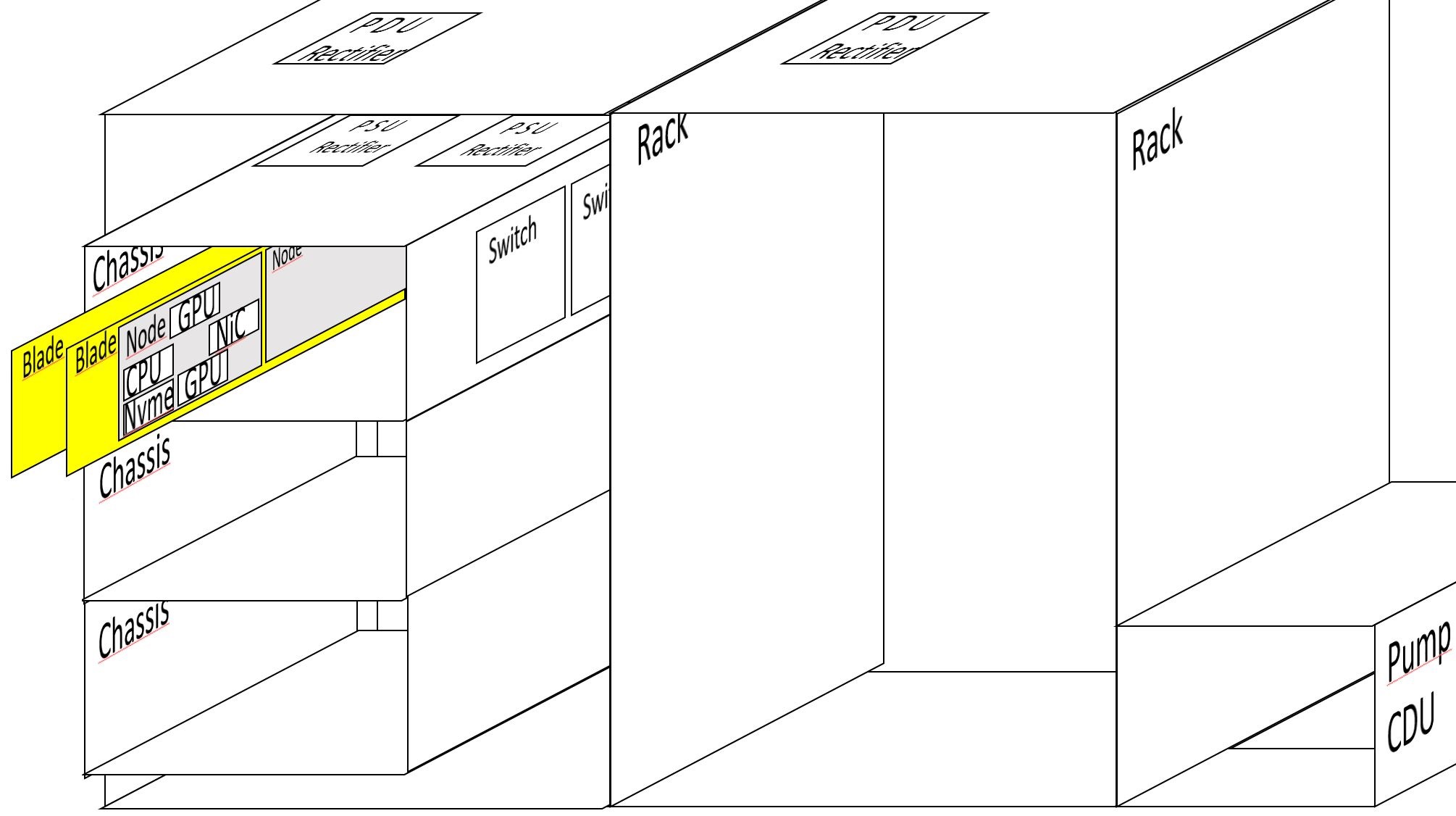
In the raps/config/<mysupercomputer>/ directory create a system.json file. Here from the exploded view of a naive supercomputer, we have:
1 CDU pump cooling 2 racks
1 PDU rectifier per rack
3 chassis per rack
2 switches per chassis
2 PSU rectifier per chassis
12 nodes per rack
2 nodes per blade
2 nodes per PSU rectifier
1 CPU per node
2 GPU per node
1 High Speed NiC per node
not written but 1 Disk/NVME per node is supposed
- That corresponds to a file raps/config/<mysupercomputer>/system.json containing:
{
    "NUM_CDUS": 1,
    "RACKS_PER_CDU": 2,
    "RECTIFIERS_PER_RACK": 1,
    "CHASSIS_PER_RACK": 3,
    "SWITCHES_PER_CHASSIS": 2,
    "RECTIFIERS_PER_CHASSIS": 2,
    "NODES_PER_RACK": 12,
    "NODES_PER_BLADE": 2,
    "NODES_PER_RECTIFIER": 2,
    "CPUS_PER_NODE": 1,
    "GPUS_PER_NODE": 2
    "NICS_PER_NODE": 1,
    "MISSING_RACKS": [],
    "DOWN_NODES": [],
    "CPU_PEAK_FLOPS": 2048E9,
    "GPU_PEAK_FLOPS": 52E12,
    "CPU_FP_RATIO": 0.667,
    "GPU_FP_RATIO": 0.667
}
Here are the descriptions of each field:
NUM_CDUS: total number of pumps
RACKS_PER_CDU: number of racks managed by one pump
RECTIFIERS_PER_RACK: number of PDU rectifier per rack
CHASSIS_PER_RACK: number of chassis/enclosures in each rack
SWITCHES_PER_CHASSIS: number of high speed network switches
RECTIFIERS_PER_CHASSIS: number of PSU per chassis
NODES_PER_RACK: total number of nodes in each rack
NODES_PER_BLADE: number of nodes in each blade
NODES_PER_RECTIFIER: number of nodes managed by each PSU
CPUS_PER_NODE: number of socket/CPU in each node
GPUS_PER_NODE: number of GPU in each node
NICS_PER_NODE: number of high speed network cards in each node
MISSING_RACKS: List of numbers indicating which rack is missing
DOWN_NODES: List of numbers indicating which node is down
CPU_PEAK_FLOPS: Floating value indicating the peak Flops of each CPU
GPU_PEAK_FLOPS: Floating value indicating the peak Flops of each GPU
CPU_FP_RATIO: Floating value between 0 and 1, used to linearly decrease the peak CPU Flops according to the number of Watts consumed
GPU_FP_RATIO: Floating value between 0 and 1, used to linearly decrease the peak GPU Flops according to the number of Watts consumed
Racks and their powering
Here is an example of a file raps/config/<mysupercomputer>/power.json for the Frontier supercomputer:
{
    "POWER_GPU_IDLE": 88,
    "POWER_GPU_MAX": 560,
    "POWER_CPU_IDLE": 90,
    "POWER_CPU_MAX": 280,
    "POWER_MEM": 74.26,
    "POWER_NIC": 20,
    "POWER_NVME": 30,
    "POWER_SWITCH": 250,
    "POWER_CDU": 8473.47,
    "POWER_UPDATE_FREQ": 15,
    "RECTIFIER_PEAK_THRESHOLD": 13670,
    "SIVOC_LOSS_CONSTANT": 13,
    "SIVOC_EFFICIENCY": 0.98,
    "RECTIFIER_LOSS_CONSTANT": 17,
    "RECTIFIER_EFFICIENCY": 0.96,
    "POWER_COST": 0.094
}
Description of fields
POWER_GPU_IDLE: number of watts consumed by a GPU when idle
POWER_GPU_MAX: number of watts consumed by a GPU when reaching its peak Flops/s
POWER_CPU_IDLE: number of Watts consumed by a GPU when idle
POWER_CPU_MAX: number of Watts consumed by a CPU when reaching its peak Flops/s
POWER_MEM: average number of Watts consumed by all the memory of all the CPU in a node
POWER_NIC: average number of Watts consumed by one high speed network card in each node
POWER_NVME: average number of Watts consumed by all the disks/NVME in each node
POWER_SWITCH: average number of Watts consumed by one high speed network switch in each chassis
POWER_CDU: average number of Watts consumed by one CDU in each line of racks
POWER_UPDATE_FREQ: number of seconds between each Watt sample
RECTIFIER_PEAK_THRESHOLD: number Watts where the current rectifier has its peak of efficiency
SIVOC_LOSS_CONSTANT: number of Watts lost
SIVOC_EFFICIENCY: value between 0 and 1 indicating the efficiency
RECTIFIER_LOSS_CONSTANT: number of Watts lost
RECTIFIER_EFFICIENCY: value between 0 and 1 indicating the efficiency
POWER_COST: number of US Dollars per KW.h consumed
Jobs and their contents
Here is an example of a file raps/config/<mysupercomputer>/scheduler.json for the Frontier supercomputer:
{
    "SEED": 42,
    "JOB_ARRIVAL_TIME": 900,
    "MTBF": 11,
    "MAX_TIME": 88200,
    "TRACE_QUANTA": 15,
    "MIN_WALL_TIME": 3600,
    "MAX_WALL_TIME": 43200,
    "UI_UPDATE_FREQ": 900,
    "MAX_NODES_PER_JOB": 3000,
    "JOB_END_PROBS": {
        "COMPLETED": 0.63,
        "FAILED": 0.13,
        "CANCELLED": 0.12,
        "TIMEOUT": 0.11,
        "NODE_FAIL": 0.01
    }
}
Description of fields:
SEED: integer used to initialize the random number generator
JOB_ARRIVAL_TIME: offset in number of seconds to calculate the arrival time of the next randomly generated job
MTBF: Mean Time Before Failure of a node
MAX_TIME: Maximum physical time (in seconds) simulated
TRACE_QUANTA: number of second between each energy sampling
MIN_WALL_TIME: number of seconds of the smallest possible job randomly generated
MAX_WALL_TIME: number of seconds of the biggest possible job randomly generated
UI_UPDATE_FREQ: Physcal time (in seconds) simulated between each User Interface update
MAX_NODES_PER_JOB: number of nodes of the biggest jobs
- JOB_END_PROBS: Probability of different ending states for randomly generated jobs (their sum should be equal to 1)
COMPLETED: probability between 0 and 1 that this state occurs
FAILED”: probability between 0 and 1 that this state occurs
CANCELLED: probability between 0 and 1 that this state occurs
TIMEOUT: probability between 0 and 1 that this state occurs
NODE_FAIL: probability between 0 and 1 that this state occurs
RAPS python input data format
RAPS requires a certain amount of data on a series of jobs in order to function.
This requires a list of jobs, where each job has the following information (as a job_dict structure described below):
Number of nodes : used by the job (integer)
Name : job name (string)
Cpu_trace : either a trace in the granularity of a trace quanta, or a single value , either in the range [0,N_CPUs]
Gpu_trace : same as cpu_trace, either a list/np.ndarray of floats or a single float, either in the range [0,N_GPUs]
Wall_time : job duration in seconds (integer)
State : completion state at the end of the job (String)
Scheduled_nodes : list of nodes assigned to the job or None (by node index) (String)
Time_offset : the submit time, or when the job enters the queue
job_id : (integer or string)
priority : priority of the job (integer)
To read data from your cluster in Raps, you need to declare your cluster and associate a dataloader with it. Dataloader will format the data from your cluster in raps format.
The power utilization is computed from the cpu_trace and gpu_trace and each value in the trace is a percentage between 0 and N_CPUs / 0 and N_GPUs respectively.
If the trace (CPU and GPU) provides a single value, constant utilization is assumed for the duration of the job.
Given these trace values the power is computed given:
raps/config/frontier/power.json (Needs to be created to for your system, while enabling your system with the –system cli parameter)
This means that you need to look up the configuration of your system and adjust these values.
Everything but CPU and GPU is considered constant at the moment.
def job_dict(nodes_required, name, cpu_trace, gpu_trace, wall_time, \
          end_state, scheduled_nodes, time_offset, job_id, priority=0):
    """ Return job info dictionary """
    return {
        'nodes_required': nodes_required,
        'name': name,
        'cpu_trace': cpu_trace,
        'gpu_trace': gpu_trace,
        'wall_time': wall_time,
        'end_state': end_state,
        'requested_nodes': scheduled_nodes,
        'submit_time': time_offset,
        'id': job_id,
        'priority': priority
    }
Resampling telemetry Joules data of compute nodes
Here we consider that we have the number of Joules irregulary sampled in a CSV infile for one compute node. The following example takes care of resets on CRAY pm counters and creates a CSV outfile regulary sampled every 20 seconds with EPOCH timestamps.
Developpers
Brewer Wesley, Maiterth Mathias, Bouknight Sedrick, Hines Jesse, Webb Tyler